
Bytecly journal
AI Agents vs. Traditional Automation: Which Is Better?
AI agents or traditional automation? Discover their differences, costs, benefits, and how to choose the right approach for your business.
- Artificial Intelligence
- AI Agents
- Automation
- LLMs
- Software Engineering
- Business Technology

Your team copies information between systems, sorts incoming requests and follows up on unfinished work. Automating some of those steps could help. The difficult part is deciding how much flexibility the software actually needs.
The choice of AI agents vs traditional automation starts with the process. Some tasks have clear rules and predictable inputs. Others require interpreting language, finding missing information or choosing among several possible next steps. These are different engineering problems, and they do not always need the same solution.
This guide explains the distinction, the costs to compare and a practical way to choose an approach for your business.
What traditional automation does
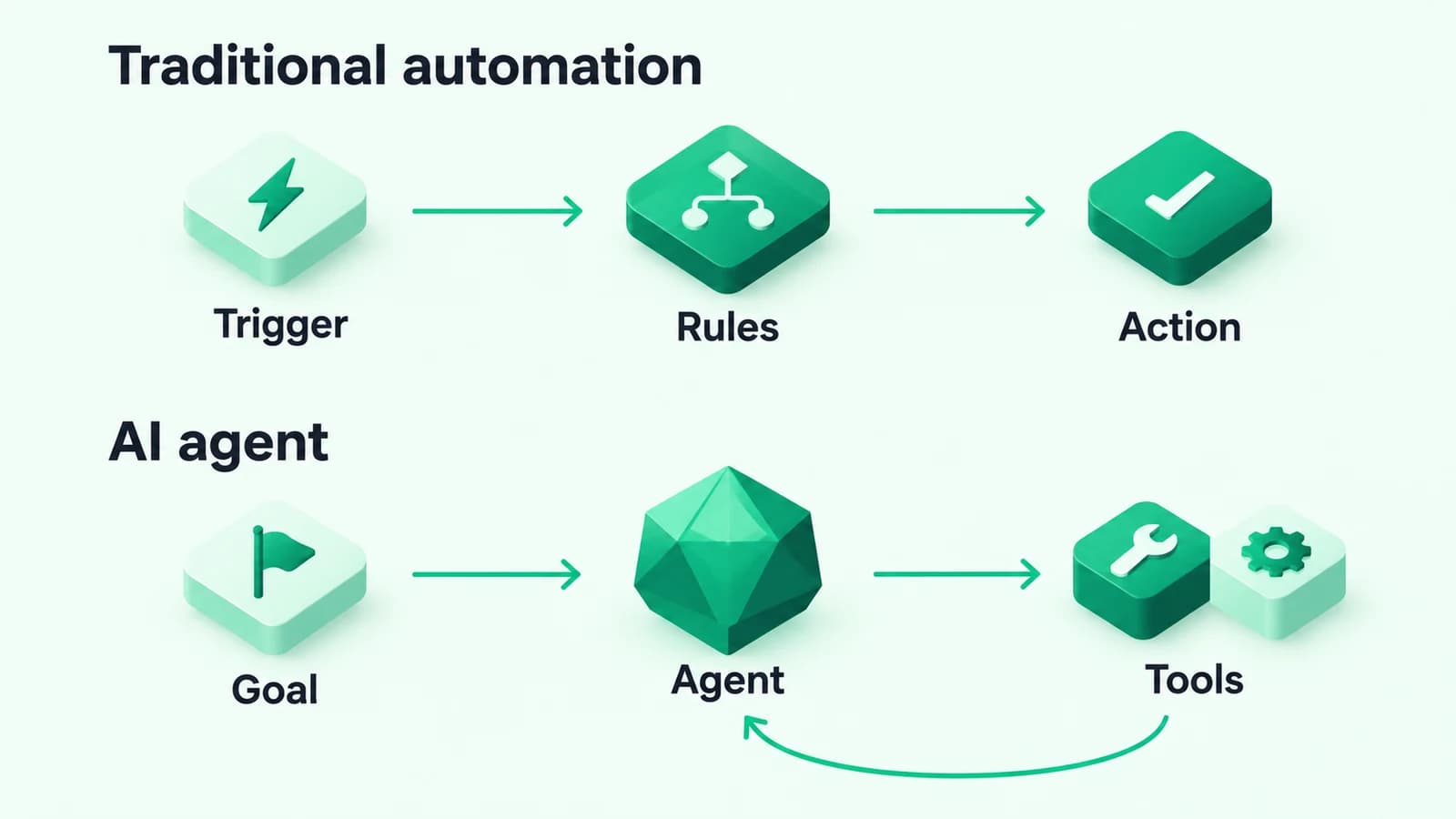
Traditional automation follows instructions defined in advance. A trigger starts a workflow, rules determine the path and connected tools perform the allowed actions.
For example, an approved order could trigger a stock check, create a record in an ERP and send an internal notification. The workflow might have many branches and integrations. Its defining feature is that people have specified those branches rather than asking a model to choose the process as it runs.
This approach works well when the business can explain what should happen for each relevant condition. It still needs maintenance, error handling and clear ownership.
What an AI agent does
An AI agent uses a model to help decide how to pursue a goal. It can select from available tools, inspect the results and choose a next step within the boundaries the application sets.
For this article, that model-directed choice is what distinguishes an agent from a fixed workflow. Anthropic makes a similar distinction between predefined workflows and agents that dynamically direct their processes in its guide to building effective agents. Product labels vary, so ask what a system actually controls when evaluating it.
Terms such as intelligent agents and agentic AI can describe different levels of autonomy. An assistant that only suggests a next action has different responsibilities from one permitted to change records. Specify the allowed behaviour instead of relying on the label.
Using AI does not require an agent
There is a useful middle option: a fixed workflow with one AI-assisted step. An LLM could categorise an incoming request or draft a summary, while ordinary code controls everything that follows.
That design can handle variable language without giving a model control over the whole process. If your team already knows the sequence of steps, start by asking whether one bounded AI feature covers the gap.
For the wider context, read Beyond Chatbots: How AI and Large Language Models Are Transforming Modern Software.
When traditional automation is a good fit
Choose a predefined workflow when inputs and decisions are sufficiently structured. Common candidates include:
- Moving an approved order between connected systems.
- Sending reminders according to an agreed schedule.
- Updating stock from a designated source of truth.
- Routing an approval based on recorded fields.
- Producing a recurring report from known data.
A deterministic rule is also appropriate when the business needs an exact calculation or an explicit policy decision. Use tested code for a discount formula or an approval limit. A model may help interpret the request around that decision, but the authoritative rule should remain explicit.
If the main problem is disconnected tools, an integration between existing systems may be the right starting point.
When an agent is worth considering
An agent becomes more relevant when the next useful step depends on information discovered during the task. Consider an internal assistant investigating an incomplete service request. It may need to look up an equipment record, consult a procedure and ask a coordinator for missing details before it can prepare a recommendation.
The important question is whether a model's ability to choose those steps improves results enough to justify the extra testing and supervision. Some tasks that initially look open-ended become manageable fixed workflows once the team maps them carefully.
Start with narrow tools and limited permissions. A first version could retrieve information and prepare a recommendation for review. You can then evaluate whether additional autonomy would help.
Compare the full operating cost
There is no universal price advantage. Both approaches involve design, integration work and ongoing support. Compare the cost of delivering an acceptable completed task, including the effort needed to correct failures.
Costs in a predefined workflow
Include connector or platform subscriptions, engineering time, hosting, monitoring and changes when connected systems update. Also account for exceptions: a workflow that constantly sends work back to people may save less time than expected.
An inexpensive connector can become costly if staff still reconcile missing or duplicate records. Map those checks before comparing proposals.
Costs in an AI-assisted or agent workflow
Include model usage, retrieval infrastructure where needed, evaluation, permission controls and human review. If a task involves repeated model and tool calls, the work per request can vary. Set budgets and stopping conditions rather than assuming each task takes one call.
For either approach, measure waiting time as well as processing cost. An automated task that needs frequent investigation can delay the next team even when its direct software cost looks modest.
Reliability means planning for exceptions
Predefined automation can follow the wrong rule, receive bad data or fail because a connected system is unavailable. Agent workflows add another source of variation: a model can misinterpret a request or select an unhelpful next step.
Define success in terms the business can verify. A successful run should produce the correct permitted outcome, not merely reach the end without an error message.
For either design, ask:
- How are missing or conflicting inputs handled? Decide when to request clarification.
- How are duplicates prevented? A retry must not silently create a second job or repeat an action.
- When does the workflow stop? Set time limits and escalation routes.
- Who can inspect the result? Record enough to investigate without collecting unnecessary sensitive data.
- How does someone recover? Make failed work visible and assign an owner.
Permissions become more important as autonomy grows
Give a workflow only the access its task needs. An assistant preparing a job summary should not automatically receive permission to delete jobs or export all customer records.
External messages and documents can also contain instructions designed to redirect a model. OWASP's prompt injection guidance covers this risk and recommends controls including restricted privileges and human approval for high-risk operations. Enforce permissions and business rules in application code; a model's response should not grant itself authority.
Check provider data handling and decide what enters prompts or logs before connecting real business information. Increase access only for a clearly defined purpose.
A hybrid workflow can combine the strengths
Many business processes need interpretation at the beginning and predictable execution at the end. A hybrid design makes that boundary explicit.
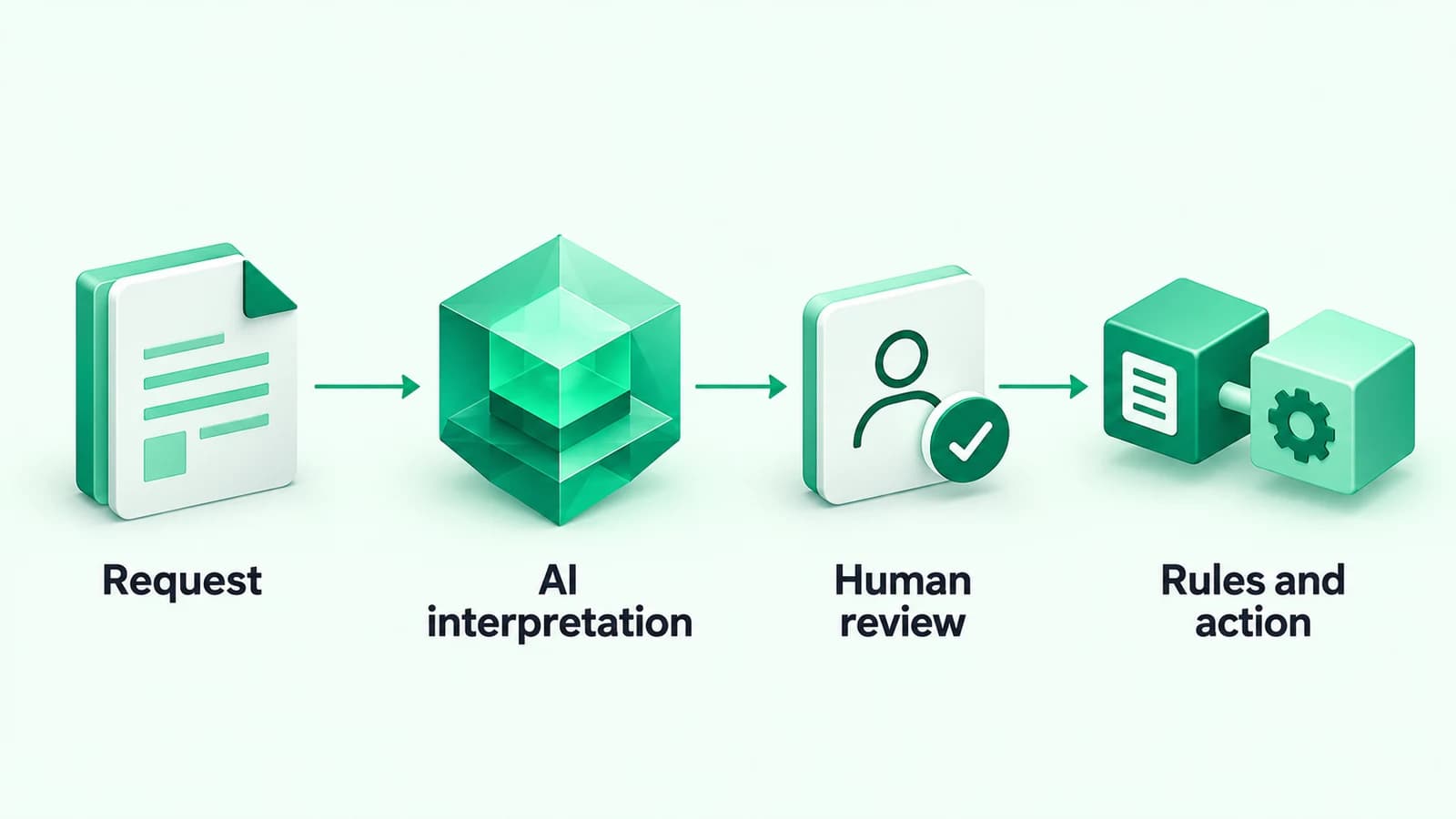
Hypothetical example: a maintenance business receives an email describing a fault. AI prepares a structured job summary and highlights missing details. A coordinator reviews the summary. Once approved, a predefined workflow creates the job and notifies the assigned team.
The interpretation step can be a single model call. It only needs an agent if selecting further lookups or follow-up steps adds value. Human review is most useful when the interface shows the original request, proposed changes and unresolved questions together.
How to choose for your business
Map one real process before choosing a platform or architecture. Follow a request from arrival to completion and identify the point where a person must interpret something.
- Use traditional automation when inputs and decisions can be expressed through clear rules.
- Add a bounded AI step when language interpretation is the main gap and the following steps are known.
- Evaluate an agent when selecting the next step is itself a meaningful part of the work.
- Keep human judgement where consequences, missing context or weak evidence make automated decisions inappropriate.
Then run a limited pilot against the current process. Include ordinary requests, incomplete ones and cases that should escalate. Agree on acceptable outcomes before testing so an impressive demonstration does not become the only basis for a decision.
Measure completion quality, review time, exception volume and total operating cost. Use those results to decide whether to expand, simplify or stop.
Start with the bottleneck
The best AI integration is shaped by the work it needs to support. A reliable connection between two systems may solve the problem. Another process may benefit from language interpretation or controlled tool selection.
Bytecly's workflow automation, AI solutions and custom software services cover these different starting points. Our process begins with discovery so the proposed system follows the business need.
To discuss a workflow, Arrange a discovery call and tell us which tools and manual steps are involved.
See our Privacy Notice for how we handle what you send us.