
Bytecly journal
ERP and E-shop Integration: A Practical Guide
How to connect your ERP, e-shop and spreadsheets so orders, stock and prices move without re-typing: integration options, planning steps and pitfalls.
- Integrations
- ERP
- Automation

In many growing businesses the ERP, the e-shop and the accounting software each work well on their own. The trouble is the space between them. Orders are copied from the e-shop into the ERP, stock levels are checked in a spreadsheet, and someone exports a report every Friday so the numbers line up. Integration is about closing those gaps so that information moves between systems without being typed in again.
This guide explains what ERP and e-shop integration means in practice, the common ways to connect systems, and how to plan an integration project without replacing tools that already work.
What integration means in practice
An integration is a connection that moves data from one system to another, either automatically or on a schedule. In a typical trade or manufacturing business, the flows that matter most are:
- Orders: from the e-shop, a B2B portal or email into the ERP.
- Products and stock: from the ERP to the e-shop, so customers see what is actually available.
- Customers and prices: kept consistent across the ERP, the e-shop and the CRM.
- Order status and documents: back to customers or the sales team, so fewer people need to call and ask.
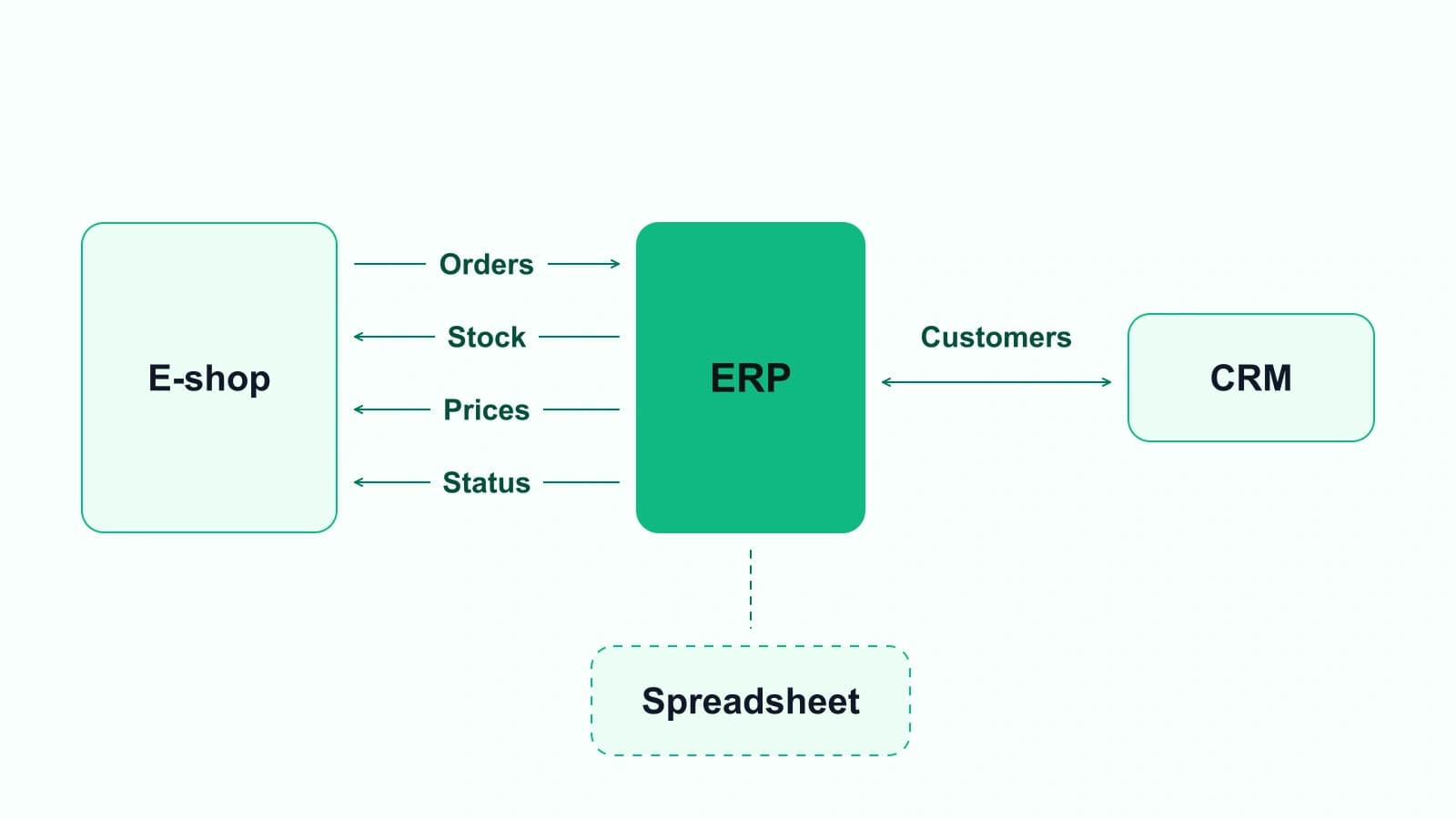
Each of these can run by hand today. An integration connects those flows using agreed rules about data direction and which system holds the master record.
Signs your systems need connecting
Not every business needs a full integration project. These signs suggest the gaps are costing real effort:
- Orders are re-keyed from the e-shop or email into the ERP.
- Stock shown online and stock in the warehouse often disagree.
- A spreadsheet sits between two systems and is updated by hand.
- Month-end or weekly reports depend on several exports being merged.
- Different teams see different prices or customer details for the same account.
- Nobody is sure which system is right when the numbers differ.
Illustration, not a client project: a wholesaler runs its ERP for invoicing and stock, an e-shop for business customers, and a spreadsheet that the sales team uses to track large orders. A connection between the e-shop and the ERP, plus a small order view for sales, could replace the spreadsheet and keep stock and orders in step.
Common ways to connect an ERP, e-shop and spreadsheets
How systems can be connected depends on what each one allows. The main options are:
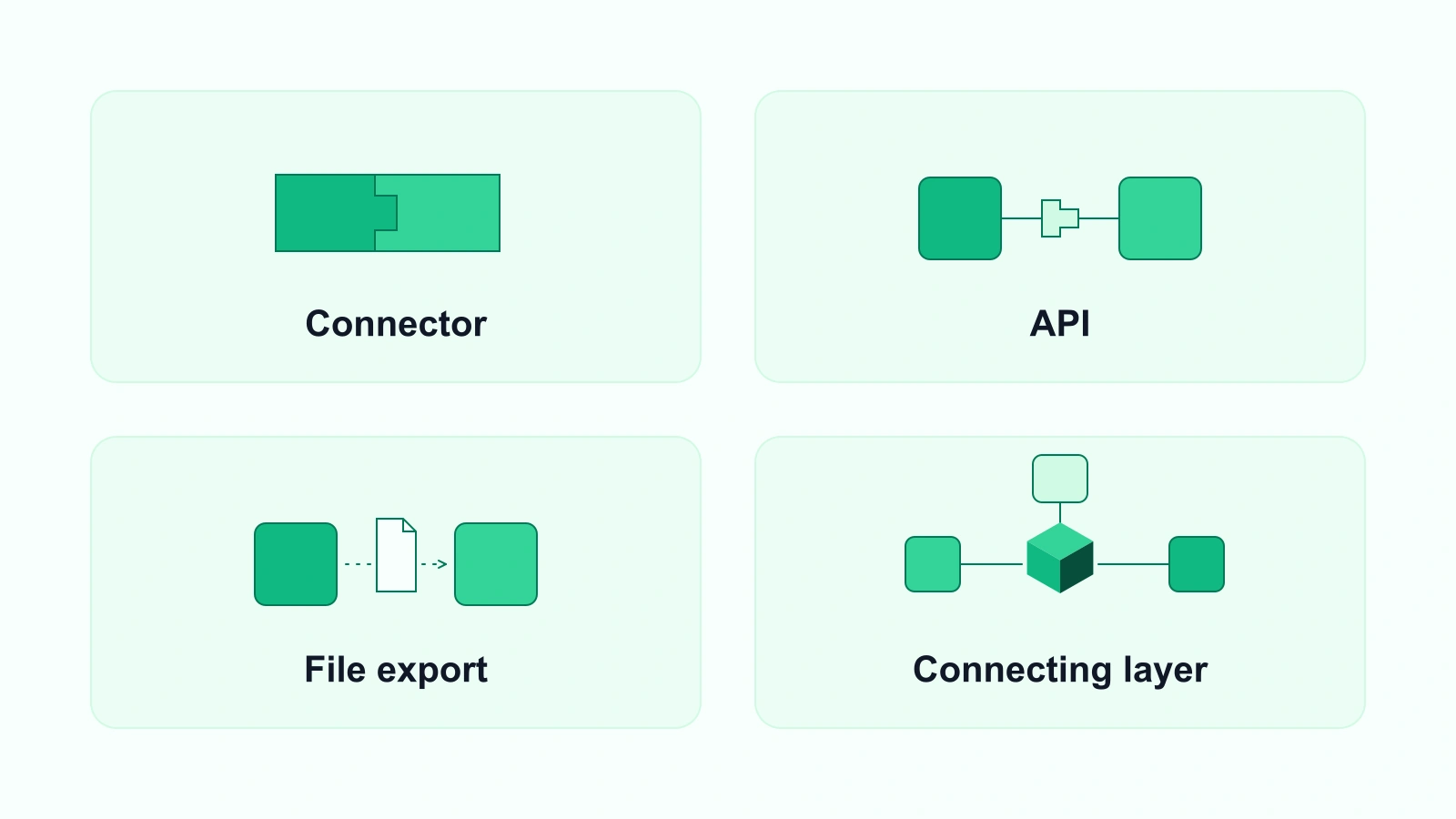
Native connectors
Some e-shop platforms and ERPs offer built-in connectors or plug-ins for each other. When a connector exists and covers your flows, it is usually the quickest option. Check exactly which data it syncs, how often, and what happens when something fails.
APIs
Many modern systems offer an API, a documented way for other software to read and write data. A custom integration built on APIs can follow your own rules, for example sending only approved orders to the ERP, or updating stock on the e-shop at set times.
File exports and imports
Older or simpler systems may only allow exports and imports, such as CSV files. These can still be automated on a schedule, with checks for missing or duplicate records.
A connecting layer of your own
When several systems are involved, a small custom application can sit between them: it collects data, applies the business rules, and shows the team what is happening. This is often where custom software and integration meet. Bytecly aims to design software around the tools a business already uses, and to connect to them where those systems provide an API or export and their terms allow it.
How to plan an integration project
A clear plan sets out the data flows, constraints and checks before work starts.
1. Map the flows
List each piece of data that moves between systems today: what it is, where it starts, where it needs to go, how often, and who handles it now.
If a flow includes personal data, such as customer names or contact details, the integration needs a lawful basis for that processing, and an outside provider that handles the data on your behalf normally works under a written data processing agreement. Check these points with your own adviser.
2. Decide the source of truth
For each type of data, agree which system holds the master record. For example, the ERP might own products and prices, while the e-shop owns online orders until they are confirmed.
3. Check what each system allows
Find out whether each system offers an API, a connector, or only exports. Some vendors limit API access by plan or charge for it, so check before you design anything. Use only the connection methods each vendor documents, and check that its terms of use allow the integration you have in mind.
4. Plan for errors
Connections fail: a product code is missing, a price does not match, a system is offline. Decide how errors are reported, who reviews them, and how records are corrected.
5. Start with one flow
Begin with the flow that causes the most manual work, often orders or stock. Get it working reliably, then add the next one.
6. Agree support after launch
Systems update, and connections need maintaining. Agree who monitors the integration and how changes are handled.
Integration or a new system?
Integration is not always the answer. If the ERP or e-shop no longer fits the business at all, connecting it may only move the problem around. But in many cases the core systems are sound, and the work that needs fixing is the manual effort between them. That is where integration and focused custom business software tend to fit best, rather than replacing everything at once.
How Bytecly approaches integration
Bytecly works on workflow automation and tool integrations, covering approvals, handoffs, reminders and reporting between the tools your team already uses. Projects follow the five-step process: discover, design, build, launch and improve. Answers on scope, timelines, code ownership and support after launch are in the FAQ.
Next step
If orders, stock or reports still move between your systems by hand, email hello@bytecly.com with a short note about the tools you use and where the manual work is. We will review it and arrange a discovery call by email.
See our Privacy Notice for how we handle what you send us.
This article is general information, not professional, legal or tax advice.